
Important: Do not provide links to this knowledge base to your students. Download any resources you wish to use, then publish them on your learning platform for students to access.
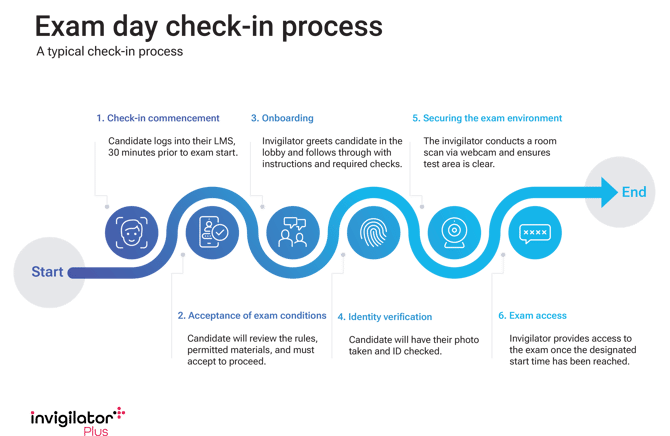
Download Exam day check-in process image
CampusQ provides several templates and resources addressing how students should prepare for an invigilatorPlus exam that you are able to adapt and supply to your students.
Preparing for an invigilatorPlus exam (Word template)
Download the Word document, customise it to suit your student cohort and add the content to your LMS.
The document covers:
- Preparing for your exam
- Check your computer set up
- Technical support
- What happens on exam day
- Exam day outline
Second camera setup guide
Download PDF and post to your LMS: Second camera setup guide
Exam warning door sign
A customisable PDF that students can print out and put on their door to prevent other people entering a room while an exam is in progress.
Download Exam warning door sign [PDF]
Graphic run sheets
- Assessment day: Preparation guide
- Exam System Check: Windows user guide
- Exam System Check: Mac user guide
Videos
- Follow the links to each video on our YouTube channel.
- Find the embed code for each video under its ‘Share’ options.
- Copy the embed code into your learning platform for your students to view the video.
Windows
Playlist: An invigilatorPlus guide for Windows
-
Prepare for your online exam with invigilatorPlus (Full guide)
-
Prepare for your online exam with invigilatorPlus (Quick checklist)
Mac
Playlist: An invigilatorPlus guide for Mac
-
Prepare for your online exam with invigilatorPlus (Full guide)
-
Prepare for your online exam with invigilatorPlus (Quick checklist)
-
Getting ready for your invigilatorPlus online exam with a Mac
Exam rules
Students should be provided with your rules before the assessment. See the exam rules page for tips on preparing rules for online assessments.
Exam System Check
Once an LTI link to invigilatorPlus has been added to the LMS and students accounts have been created on invigilatorPlus, students will be able to run the Exam System Check via the invigilatorPlus website.
The Exam System Check covers:
- invigilatorPlus browser extension installation
- webcam, microphone and screensharing permissions
- speaker volume
- internet connection speed